
AI-generated landing pages are often 90% ready to ship within minutes. The overall layout works, typography feels modern, and the core narrative is already approved. The bottleneck hits in the final mile: a headline that feels slightly too generic, a value proposition paragraph that needs sharpening, or a primary CTA button that needs to drive a specific conversion action.
In traditional AI workflows, this is where teams fall into the prompt-regeneration trap. Submitting a broad prompt like "make the headline more compelling and change the CTA" forces the model to regenerate the entire HTML document. In doing so, the LLM frequently wipes out approved styling, scrambles responsive layout classes, alters brand colors, or invents new layout artifacts. A five-minute copy tweak turns into an hour of regression debugging.
Targeted AI refinement solves this by introducing a strict visual authorization boundary: you mark the exact elements permitted to change, pass explicit instructions, and guarantee that unselected markup remains completely untouched. This guide breaks down the surgical editing methodology using a controlled RelayGrid onboarding landing page as a live demonstration, showing how to move from initial AI drafts to production-ready pages with zero code regression.
Why Full-Page AI Regeneration Fails at the Finish Line
When you ask a generative model or vibe-coding tool to rewrite an entire page for a local change, three predictable failure modes occur:
- Style and Class Drift: The model may swap Tailwind utility classes, inline CSS, or container widths, subtly breaking mobile responsiveness or grid alignment.
- Hallucinatory Content Shifts: Elements outside your focus—such as footer links, customer testimonial quotes, or micro-copy—get silently rewritten or dropped.
- Compounding Review Debt: Instead of reviewing just the one headline you wanted to change, your team must perform a full-page regression audit after every single prompt.
The antidote is scoped authorization: constraining the AI's operational scope strictly to designated DOM nodes while freezing the rest of the document tree.
The Scoped Authorization Matrix: What to Select vs. What to Protect
Effective targeted refinement is not about keeping every request tiny—it is about matching the selection boundary directly to your intent. Before touching any controls, establish what belongs inside your editing boundary and what must remain locked outside.
| Optimization Task Elements to Select (In-Scope) Elements to Freeze (Out-of-Scope) | ||
| Sharpen Value Proposition | Hero primary heading & supporting subtitle | Navbar, product UI mockup, badge tags, background grid |
| Conversion / Action Pivot | Specific primary CTA button | Secondary ghost buttons, text links, trust badges |
| Section Localization / Redesign | Entire self-contained section container | All adjacent sections, global headers, footers |
By enforcing this distinction, every iteration has an unambiguous, auditable blast radius.
The 5-Stage Targeted Refinement Workflow
To see this methodology in action, consider the RelayGrid customer onboarding landing page. The goal is to transform a generic hero section into a high-converting B2B proposition without touching its layout, interface illustration, or social proof.
Stage 1: Establish a Stable HTML Baseline
Targeted refinement begins with production HTML rather than re-prompting from a raw text prompt. In HtmlDrag, the AI Refinement workspace allows you to load existing source files via direct upload, raw code paste, or live URL extraction. Loading standalone HTML ensures that all CSS stylesheets, framework classes, and DOM hierarchies are locked as the deterministic baseline.
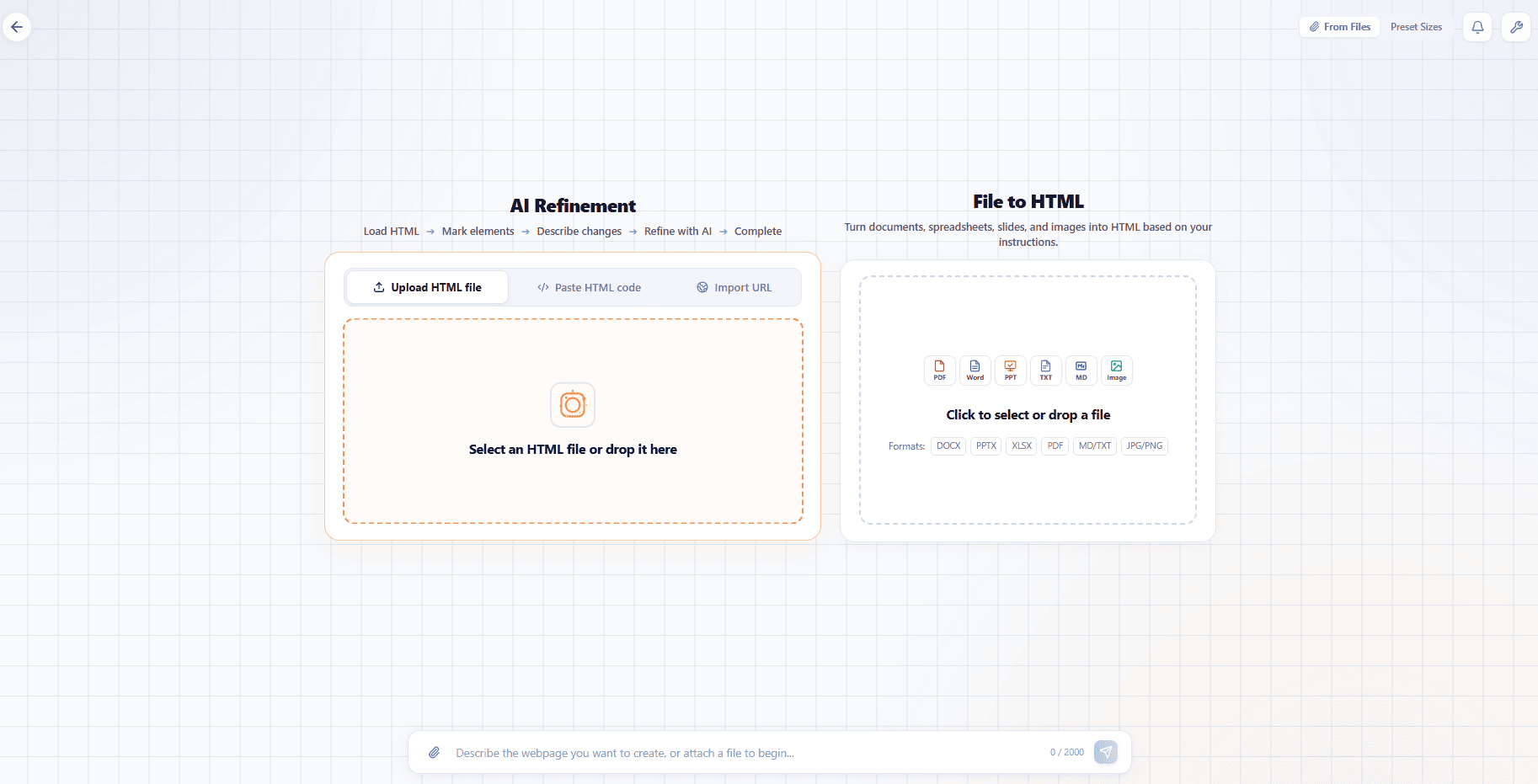
Figure 1: Loading existing HTML establishes a stable baseline for subsequent scoped modifications.
Once rendered in the canvas, perform a structural inspection. Identify exactly which copy blocks fail your messaging standards and which design assets are already production-grade.
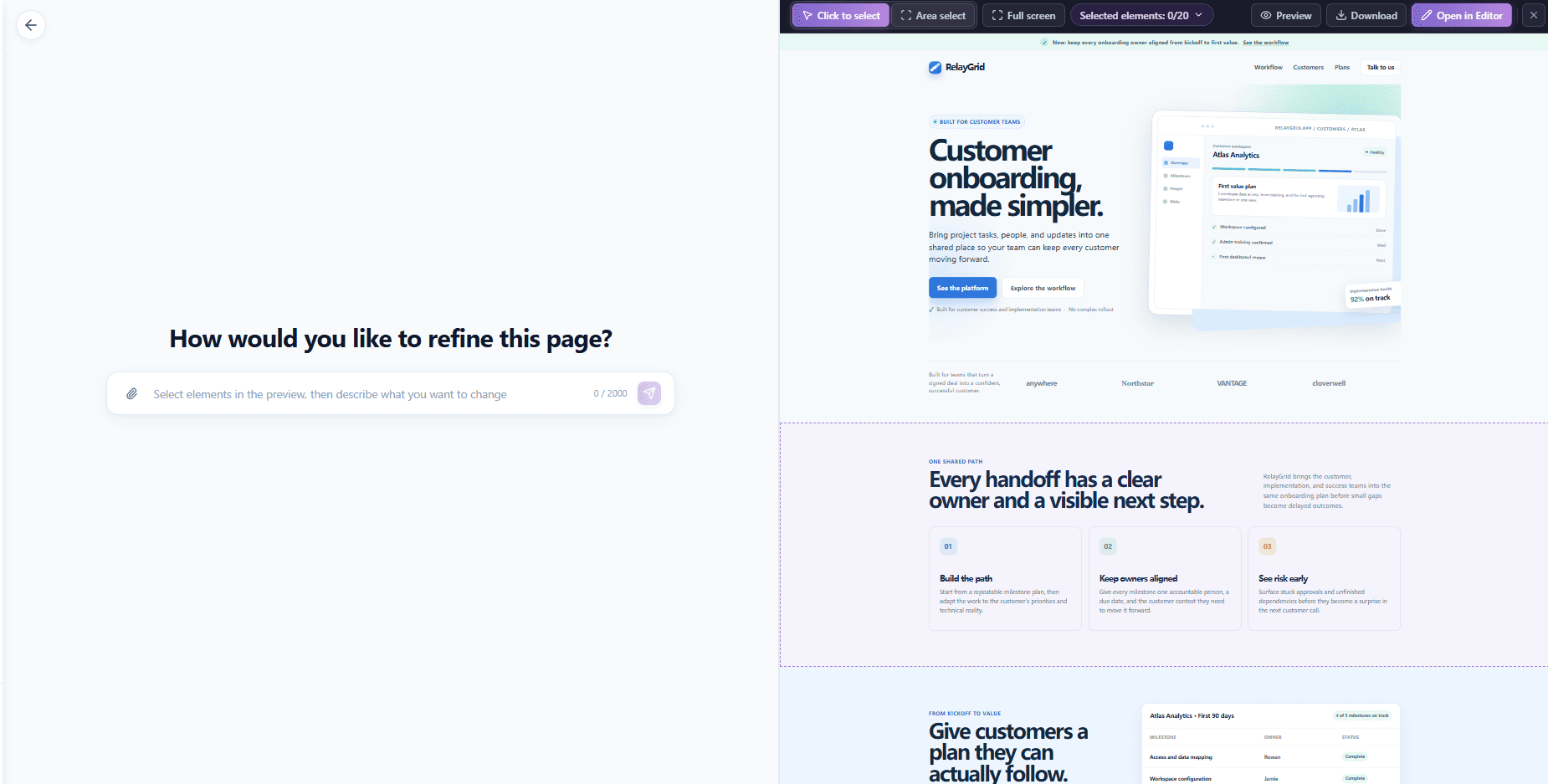
Figure 2: Inspecting the baseline page reveals that the layout and UI card are ready, while the headline and CTA need sharper focus.
Stage 2: Surgical Target Isolation
Rather than instructing the AI to "update the hero," use element-level selection to isolate targets. In this example, three discrete numbered markers are attached:
- Marker 1: The primary `<h1>` headline ("Customer onboarding, made simpler.")
- Marker 2: The supporting paragraph text below it.
- Marker 3: The primary action button ("See the platform").
Notice what is intentionally left unmarked: the product dashboard preview on the right, the top notification pill, the secondary button, and the client logo banner. They remain physically outside the AI's mutation context.
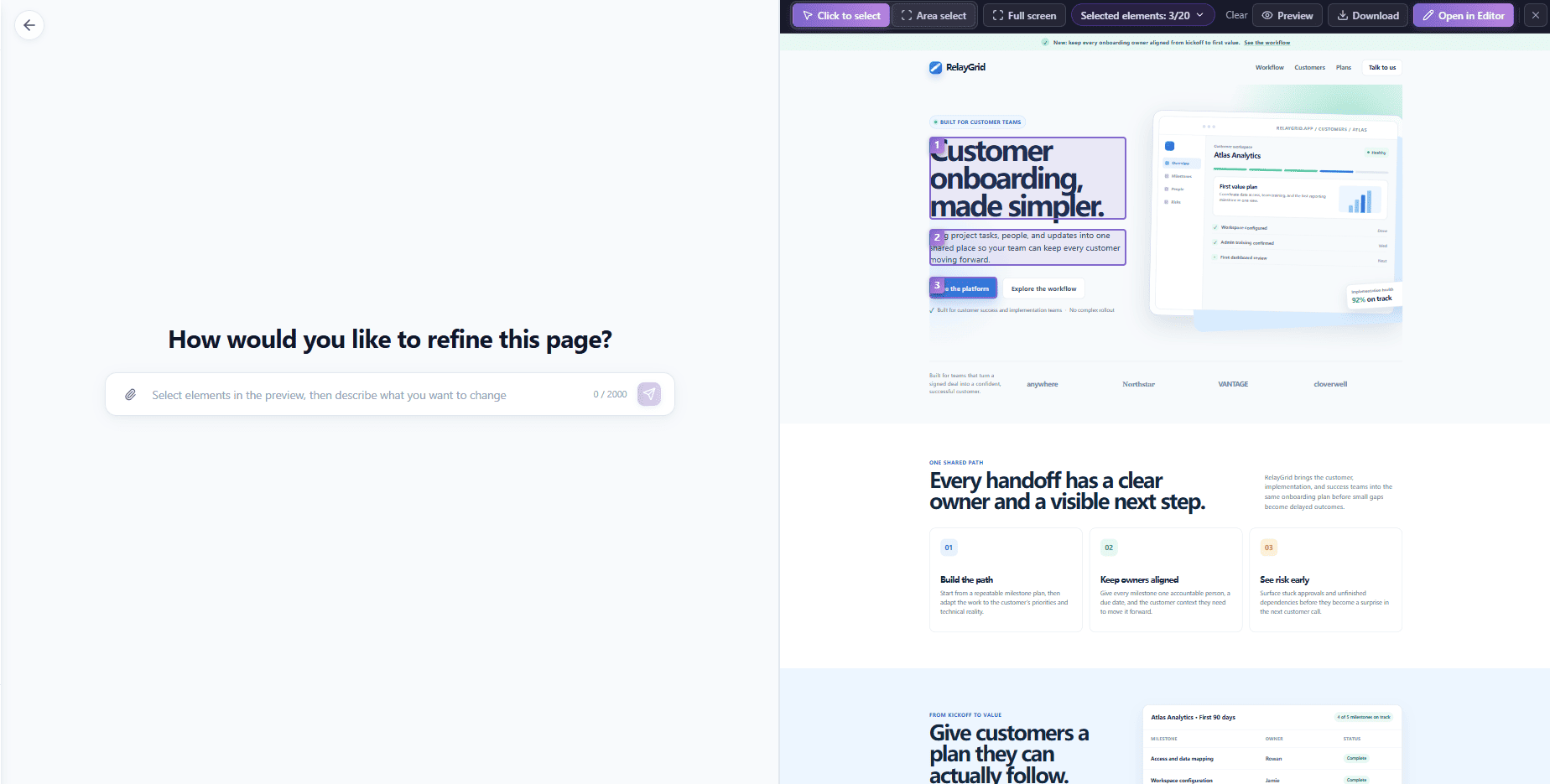
Figure 3: Discrete visual markers explicitly map each targeted DOM node to an upcoming prompt instruction.
Stage 3: Dual-Constraint Prompting (Specify & Guard)
A professional targeted refinement prompt consists of two paired directives: Explicit Mutations and an Explicit Boundary Guard. Map each numbered marker directly to an outcome, and explicitly prohibit changes to unmarked code.
Update only the three numbered marked elements:
1. Replace the headline with: Turn every customer handoff into faster first value.
2. Replace the supporting paragraph with: Give your B2B onboarding team one shared plan for owners, milestones, and blockers—so customers reach first value with less chasing.
3. Change the primary CTA label to: Book an onboarding walkthrough. Change its background color to #153852. Keep its white text, current padding, rounded shape, and placement.
Guard Clause: Do not change any unmarked content, layout, product preview, navigation, customer proof, or other buttons.
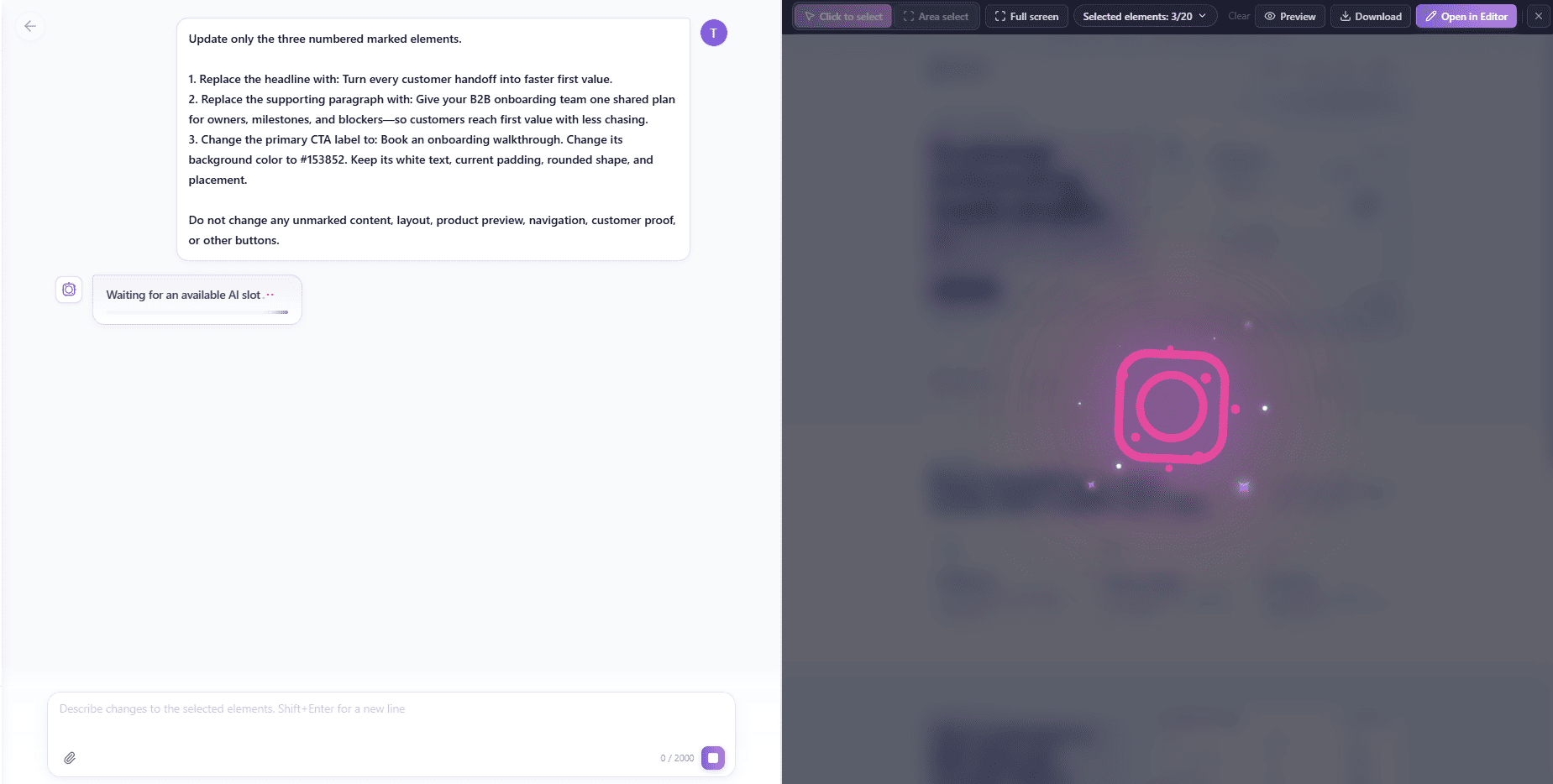
Figure 4: The instruction binds numbered markers to specific copy and styling rules while freezing unmarked areas.
When the model returns the result, validation requires only a single question: Did the targeted nodes update accurately, and did the frozen DOM nodes remain 100% byte-for-byte identical? As seen in the result below, the new copy and button color apply seamlessly while the surrounding layout remains untouched.
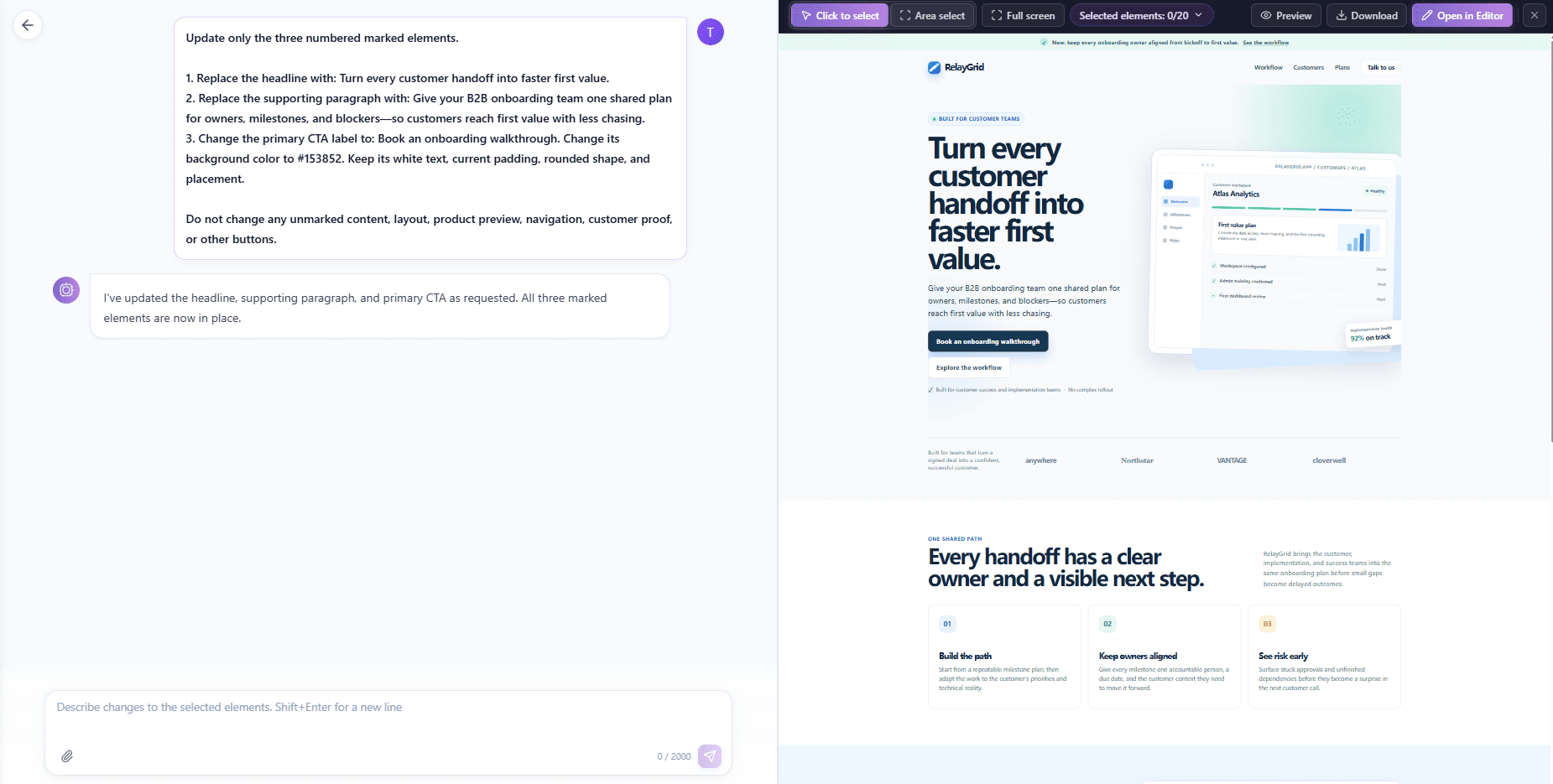
Figure 5: The updated headline and CTA button render inside the preserved landing page structure.
Stage 4: Decremental Iteration (Tighter Micro-Passes)
A frequent misconception is attempting to achieve perfection in a single giant prompt. High-efficiency engineering teams use decremental iteration: each subsequent prompt addresses a smaller scope than the previous one.
Here, the first pass produced a solid subtitle, but it feels slightly wordy for a modern SaaS hero. Instead of re-evaluating the headline or button, the second pass marks only that single paragraph, instructing the AI to compress it into a punchy sentence while strictly locking its font size, color, width, and position.
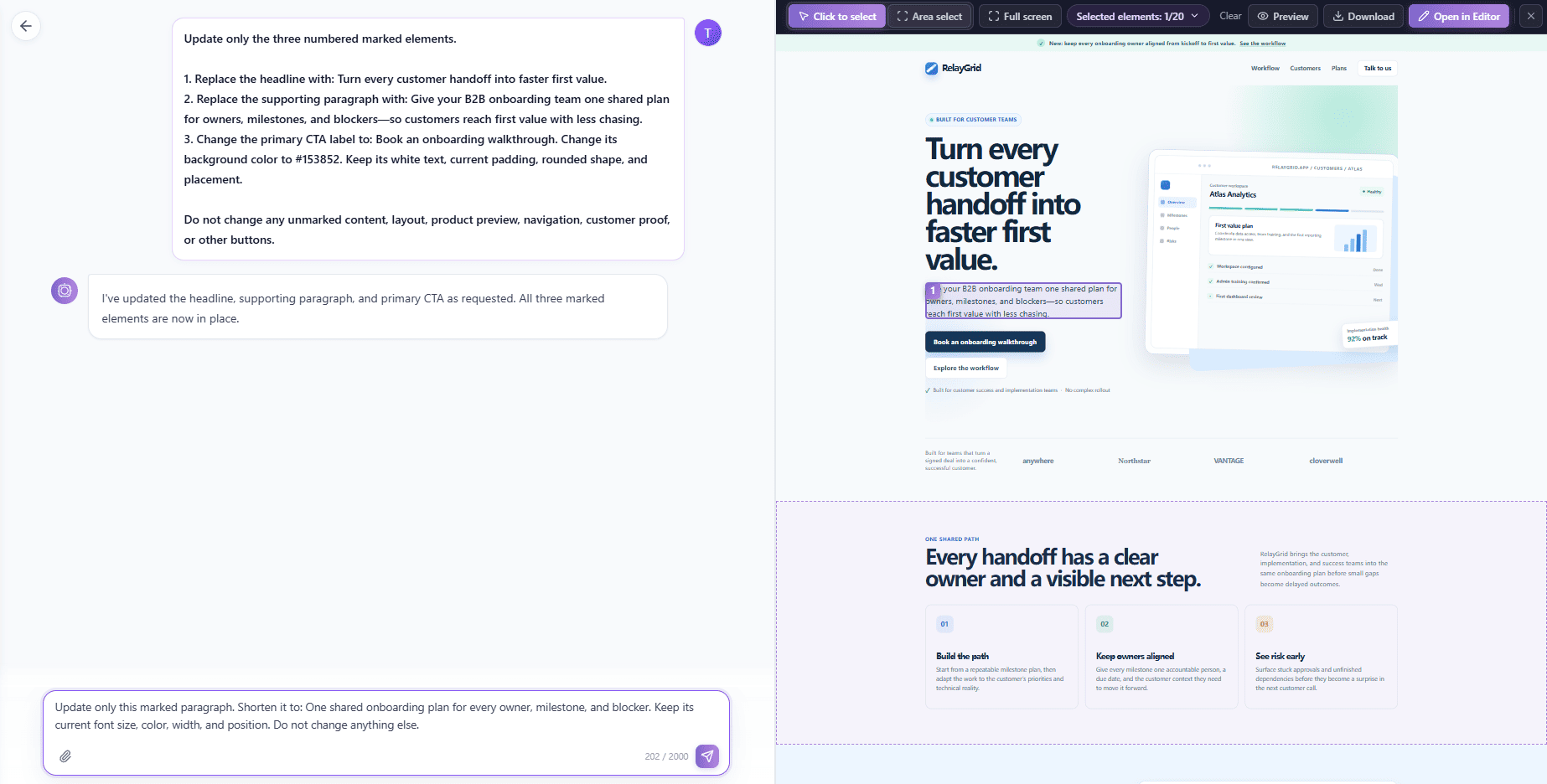
Figure 6: A micro-scoped second pass focuses exclusively on condensing the supporting paragraph.
The resulting output drops straight into place: "One shared onboarding plan for every owner, milestone, and blocker." By narrowing the scope to a single element, the risk of collateral layout damage drops to zero.
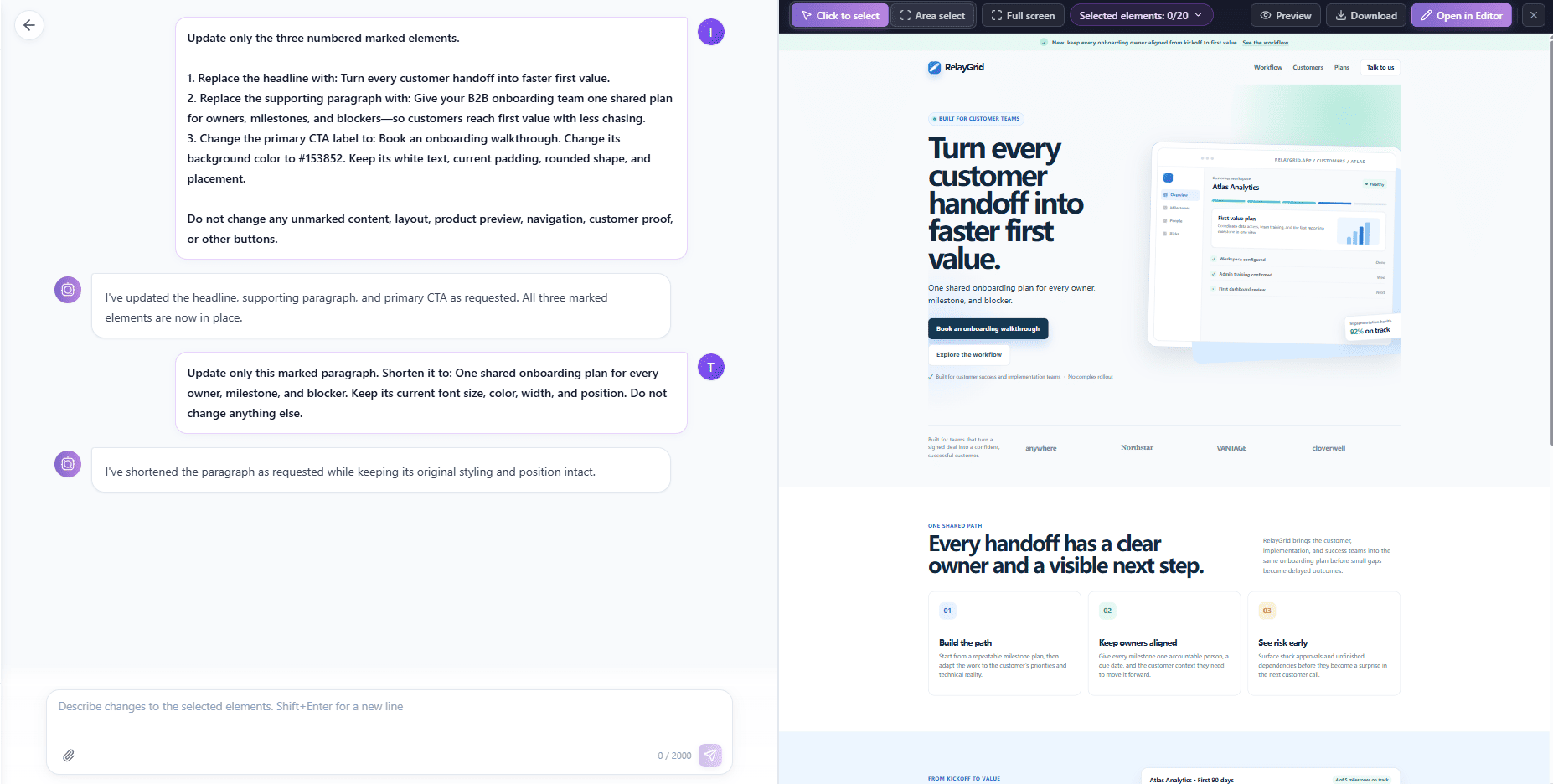
Figure 7: The second micro-pass achieves concise copy without disturbing the headline, CTA, or graphic hierarchy.
Stage 5: Macro Block Transformations & Async Task Execution
While element-level granularity is ideal for micro-copy, certain tasks require modifying an entire logical block together. For instance, translating a conversion section or updating a localized promotional banner requires all headlines, descriptions, and button micro-copy to adapt synchronously.
In such scenarios, deliberately mark the entire section container rather than scattering multiple individual markers. This ensures that the AI evaluates semantic coherence across all internal child nodes.
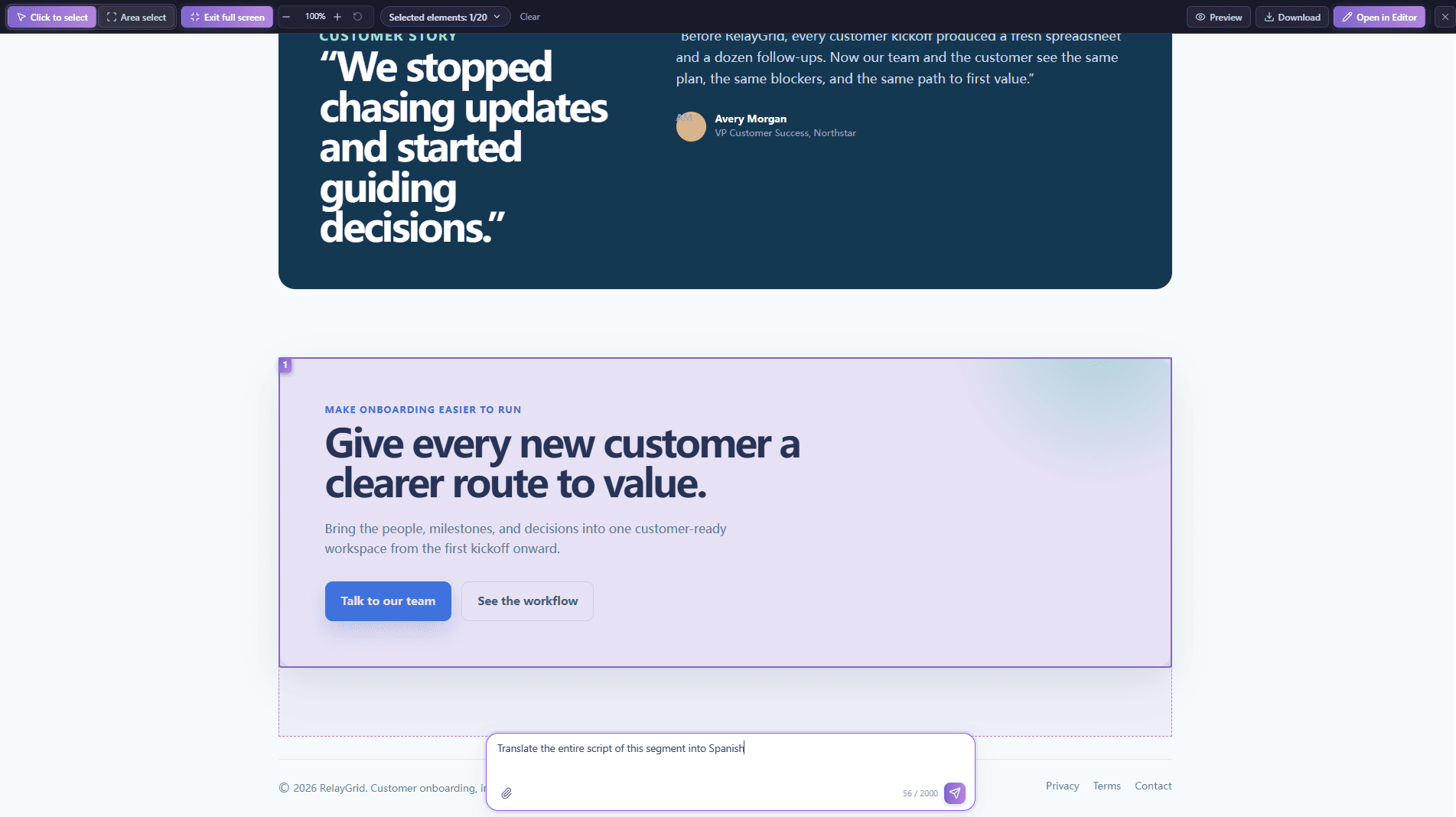
Figure 8: Selecting an entire section container is appropriate when child elements must adapt as a cohesive unit.
When running complex multi-node transformations, modern AI engines operate through managed queuing systems. A status indicator such as "Waiting for an available AI slot" signifies that the job is queued for execution. Maintaining strict engineering rigor means treating queuing states as active background tasks, validating changes only when final rendering completes.
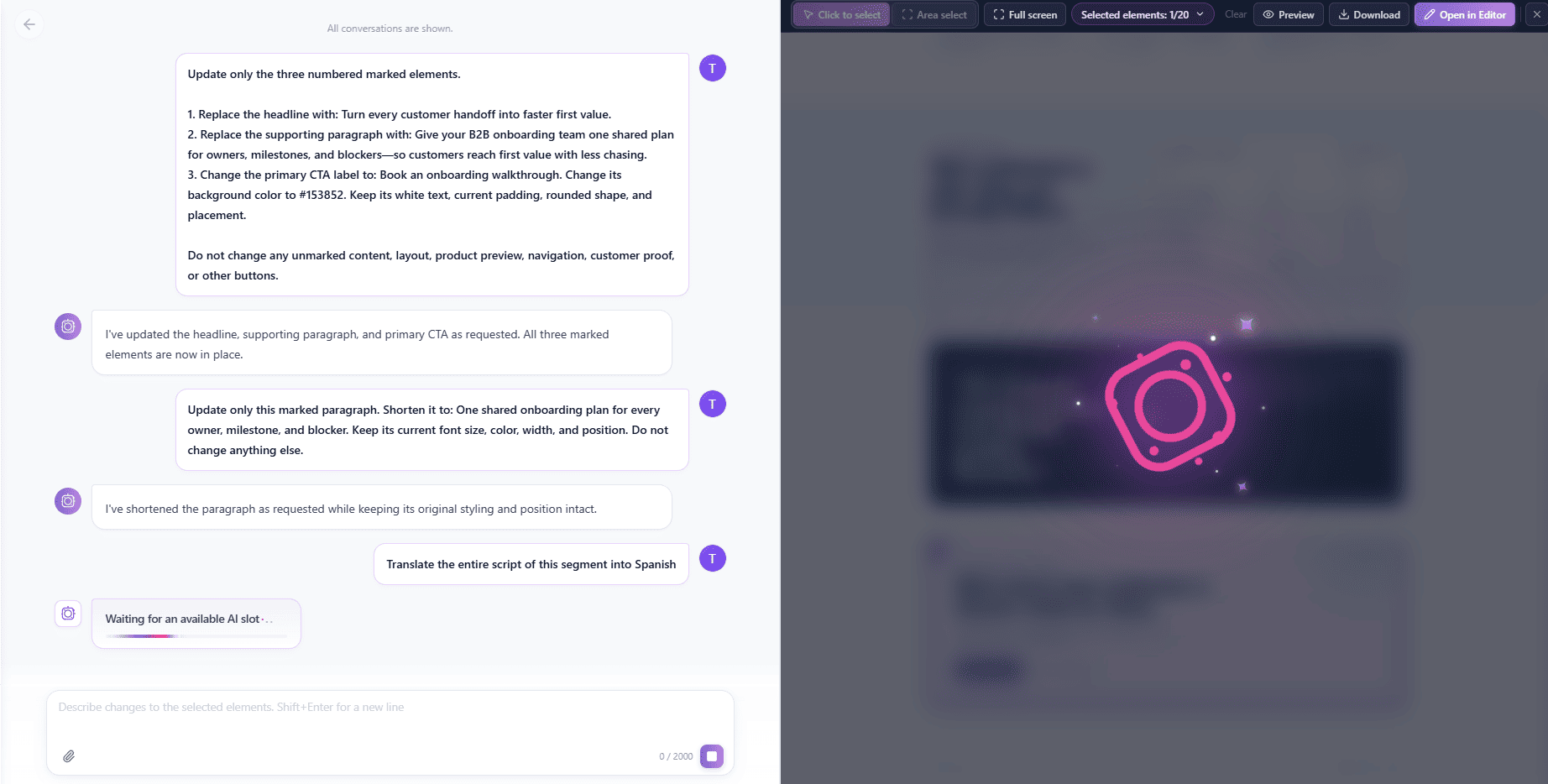
Figure 9: Managed execution queues ensure stable resource allocation during heavier structural and language updates.
The Hybrid Bridge: Where Visual Editing Takes Over from AI Prompting
AI is outstanding at semantic transformation, drafting compelling copy, and refactoring structure. But using natural-language prompting for pixel-level alignment or micro-adjustments (like "move this button 4 pixels down and change the hover opacity to 0.85") is inefficient and unpredictable.
The optimal modern workflow is a hybrid pipeline: use targeted AI refinement for the heavy semantic lifting, then transition directly into a full-featured visual editor for final polish.
In HtmlDrag, clicking Open in Editor instantly transfers the refined page into a WYSIWYG visual development environment. This gives marketing and design teams direct access to high-precision capabilities:
- Component & Element Insertion: Drag in new layout containers, badges, icons, or cards directly into the DOM tree.
- Table Insertion & Editing: Build and format feature comparison matrices or pricing tiers without writing complex HTML table markup.
- Element Locking: Lock finished sections or critical branding assets to prevent accidental movement or edits during team collaboration.
- Element Deletion & Cleanup: Instantly prune obsolete elements or placeholder containers left over from early prototypes.
- Hyperlink & Target Management: Bind tracking URLs, anchor links, and external destinations to buttons and navigation elements.
- Version Management & Clean Export: Save immutable version checkpoints to track changes and export production-ready, clean HTML free of extraneous editor wrappers.
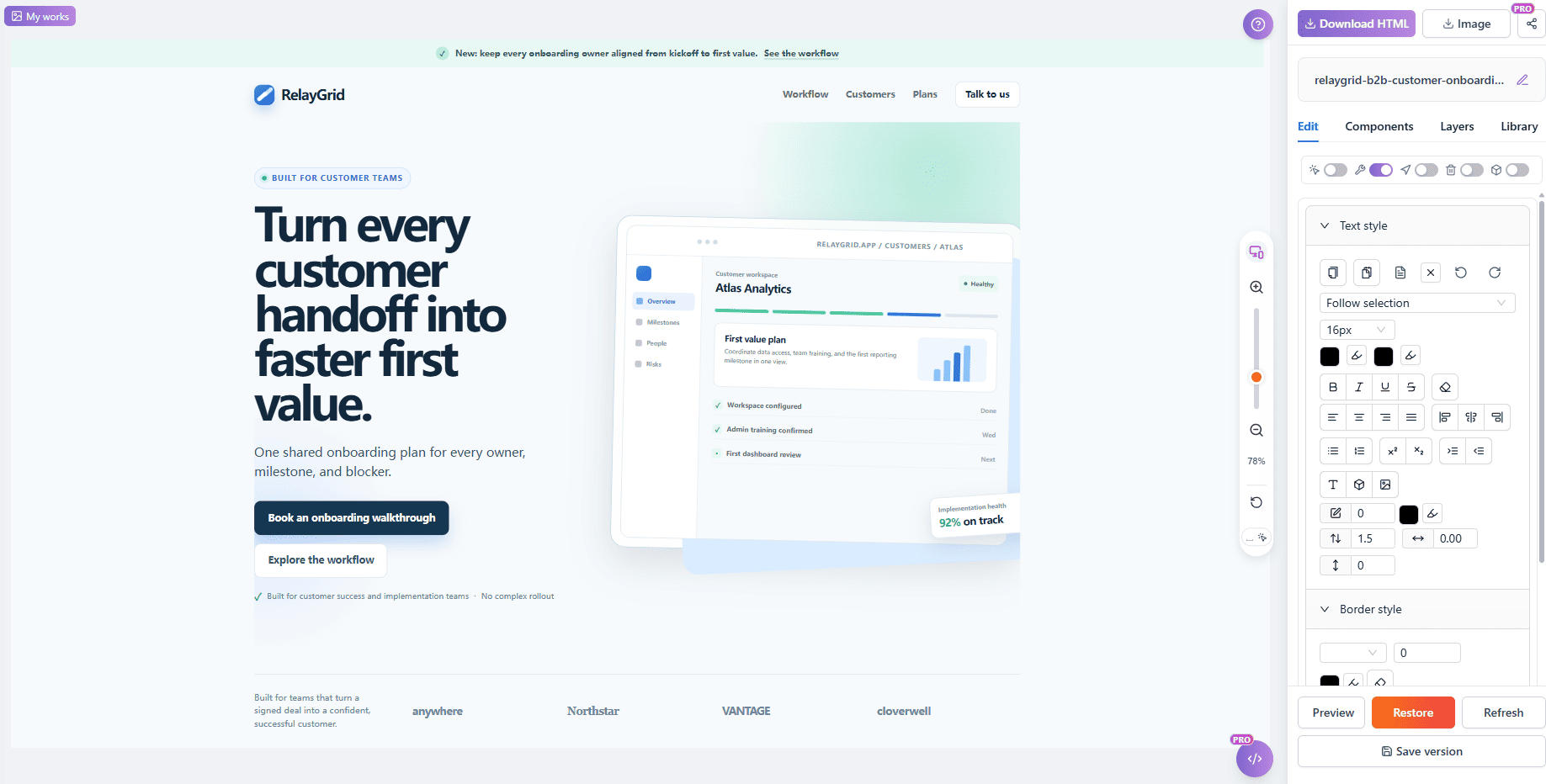
Figure 10: Seamlessly transitioning into the visual editor enables direct styling, component insertion, and versioned exports.
Prompt Patterns for Targeted HTML Refinement
When executing targeted edits, structure your prompts using these battle-tested patterns to maximize precision:
| Refinement Goal Recommended Prompt Pattern | |
| Value Proposition Polish | "Update only marked element [1]. Rewrite the heading to focus on [Core Outcome, e.g. cutting onboarding churn]. Keep font weight, typography styles, and responsive sizing intact. Do not touch unmarked elements." |
| CTA Conversion Pivot | "Update only marked button [2]. Change label to '[New Action, e.g. Start Free Trial]'. Update background to [HEX Color] while preserving corner radius, padding, and layout positioning. Guard all adjacent links." |
| Concise Text Compression | "Update only marked paragraph [1]. Shorten this text to under 15 words highlighting [Key Benefit]. Maintain exact line-height, text color, and alignment. Do not alter surrounding containers." |
Pre-Flight Checklist for Scoped AI Refinement
- Lock the Baseline: Upload a complete, standalone HTML page to ensure CSS styles and media queries are firmly anchored.
- Enforce Minimum Viable Scope: Select only the exact DOM nodes that require modification. Avoid bundling unrelated containers.
- Use Numerical Binding: When marking multiple elements, assign explicit 1-to-1 instructions to numbered markers.
- Include Guard Clauses: Always add an explicit sentence forbidding modifications to unmarked code and layout.
- Adopt Decremental Iterations: Make pass 2 narrower than pass 1. Isolate text polishing from CTA restyling.
- Leverage the Visual Editor for Manual Details: Do not fight AI on pixel alignment; use direct visual tools for locking, links, and table insertion.
- Verify Before Deployment: Confirm that untargeted sections retained their original markup before exporting your final HTML.
Frequently Asked Questions
Why does regenerating an entire HTML page cause style regressions?
Large language models generate text probabilistically token by token. When tasked with re-emitting an entire 1,500-line HTML file for a small copy change, the model often substitutes utility classes, omits critical responsive breakpoints, or reorders DOM nodes, causing visual regressions.
Can I edit both Tailwind CSS and raw inline styles with targeted refinement?
Yes. Because targeted refinement operates within a bounded DOM context, the AI parses the existing classes or inline styles of the selected node and applies modifications strictly within that local context, keeping global CSS sheets untouched.
What is the advantage of using visual markers over describing elements in text?
Describing elements with text like "the second button under the main heading" introduces semantic ambiguity. Visual markers bind directly to specific DOM elements, eliminating guessing and ensuring the prompt is applied exclusively to the intended node.
When should I switch from AI refinement to the visual editor?
Use AI refinement when you need content drafting, message pivoting, tone adjustments, or structured text rewriting. Switch to the visual editor for direct manual control: element alignment, table formatting, locking sensitive components, inserting links, and exporting clean code.
Final Take: Stop Rewriting, Start Refining
Achieving production-ready landing pages does not require endless prompts or full-page rebuilds. When an AI builder or vibe-coding tool generates a landing page that is 90% right, the winning strategy is surgical refinement: upload existing HTML, isolate the exact nodes that need work, enforce strict authorization boundaries, and hand off to a visual editor for the final human touch.
Ready to escape the prompt-regeneration trap? Experience how targeted visual AI editing can transform your landing page workflow at HtmlDrag.