
Direct Answer / Key Takeaway: To update an AI-generated pricing page without breaking its layout, teams must treat the existing production HTML as an immutable baseline and enforce a 4-step refinement architecture: (1) Establish an explicit Fact Contract separating modified quotas from frozen tiers; (2) Apply Scoped DOM Prompts targeting only the specific plan cards rather than regenerating the entire document; (3) Cascade data synchronization across secondary comparison matrices and FAQ accordions with structural guard clauses; and (4) Use a Visual HTML Editor for precision finishing—such as table cell tuning, element locking, and UTM link binding. A pricing update is only production-ready when the hero cards, comparison table, and FAQ articulate identical numbers; modifying a single card in isolation is an incomplete release.
Generating a high-converting SaaS landing page with AI tools like v0, Lovable, Claude Artifacts, or Cursor takes minutes. However, maintaining that page over time introduces an entirely different challenge. The moment your commercial model evolves—whether increasing agent seats, adjusting monthly conversation quotas, or clarifying a Call-to-Action (CTA)—most teams encounter the notorious Prompt-Regeneration Trap: submitting a broad prompt like "Update the Team plan to 8 seats and make the pricing page look cleaner."
When an LLM attempts to rewrite a 1,500-line HTML file from scratch, chaos inevitably follows: carefully tuned Tailwind CSS grids collapse, sibling pricing tiers (such as Starter or Enterprise) suffer silent hallucinations, comparison matrix tables lose their column alignments, and hardcoded tracking parameters or checkout IDs disappear. A task that should have taken two minutes turns into an agonizing multi-hour debugging cycle.
This guide demonstrates a production-grade, non-destructive workflow for refining existing AI-generated pricing pages using the fictional customer-support platform Cedarline. By combining scoped DOM isolation with targeted visual editing in HtmlDrag, you can update tier metrics, maintain perfect data parity across matrices and FAQs, and preserve your validated responsive layout with zero CSS regression.
Why Pricing Pages Suffer from Multi-Tier Desynchronization
Unlike standard marketing landing pages, a SaaS pricing page is a high-stakes financial contract between your product and your prospective buyer. Information is intentionally repeated across multiple distinct DOM subtrees to serve visitors at different stages of evaluation:
- The Hero Pricing Cards: Provide scannable, high-level summaries for fast decision-making (price, core seat allowance, primary CTA).
- The Feature Comparison Matrix: Caters to detail-oriented evaluators comparing granular limits (usage quotas, shared inboxes, advanced reports, API access).
- The Plan FAQ Accordion: Resolves specific buyer anxieties regarding overage charges, billing cycles, and feature boundaries.
- Checkout Routing & Badges: Guides the buyer into the payment gateway or sales scheduling funnel with explicit attribution parameters.
When a tier changes, updating only the hero card creates a severe information desynchronization. If your hero card promises 8 agent seats and 2,500 monthly conversations for $49, but the comparison table below still lists 5 seats and 1,000 conversations, prospective customers immediately perceive conflicting commitments. This discrepancy destroys buyer trust, lowers conversion rates, and creates avoidable customer support and refund disputes post-checkout.
Phase 1: Establishing the Immutable Fact Contract
Before executing any AI modifications or touching the HTML markup, establish a strict Fact Contract. This document defines three non-negotiable boundaries: what is actively being modified, what baseline values must remain strictly frozen, and what surrounding elements are explicitly protected from alteration.
In our Cedarline production example, our commercial objective is to increase the value proposition of the middle Team plan while keeping its $49/month price point intact, leaving both the entry-level Starter ($19/mo) and high-volume Scale ($129/mo) tiers untouched.
| Pricing Tier Metric Legacy Baseline (Cedarline) Approved New Fact Contract Scope Boundary Rule | |||
| Team Monthly Price | $49 / month | $49 / month (Unchanged) | Freeze numeric value and currency symbol |
| Included Agent Seats | 5 included agents | 8 included agents | Must synchronize across Card, Table, and FAQ |
| Monthly Conversation Quota | 1,000 conversations/mo | 2,500 conversations/mo | Must synchronize across Card, Table, and FAQ |
| Hero Action Button (CTA) | "Compare plans" | "Compare Team" | Update label text; strictly preserve existing href |
| Sibling Tiers (Starter & Scale) | $19 (2 seats) / $129 (15 seats) | 100% Frozen Baseline | Zero prompt modification permitted |
 Figure 1. The baseline Cedarline pricing page imported via HTML upload. The existing layout, typography, and color palette form the immutable reference for this refinement session.
Phase 2: Architectural Decision Matrix: AI vs. Visual Editing
A common mistake in AI-assisted development is attempting to force every modification through an LLM prompt. Highly experienced engineers practice task decomposition: letting AI handle complex text synthesis and multi-element property updates, while delegating atomic adjustments (such as changing a button destination or locking a grid) to direct visual DOM tools.
| Refinement Scenario & Task Recommended Mechanism Acceptance Criteria & Guardrails | ||
| Updating tier metrics and plan copy | Scoped DOM AI Refinement (Targeted subtrees) | New numbers render cleanly; surrounding cards and layout containers remain untouched. |
| Synchronizing multi-tier tables & FAQs | Secondary Scoped AI Pass (Details container) | Table cells and FAQ answers match card metrics exactly; column counts and row ordering preserved. |
| Modifying a single CTA link or UTM tag | Visual Hyperlink Inspector | Destination URL contains complete parameters; no unnecessary prompt roundtrip. |
| Adding/removing a feature comparison row | Visual Table Manipulation Tool | New `<tr>` row aligns with all tier columns; responsive horizontal scrolling remains intact. |
| Preventing accidental layout shifts | Visual Element Locking (`Lock` feature) | Validated cards cannot be dragged or reformatted while working on lower sections. |
| Backend billing & Stripe integration | Production Codebase / Stripe Dashboard | HTML reflects marketing copy; billing webhooks and checkout sessions must be verified independently. |
Phase 3: Production Prompt Pattern Library with Guard Clauses
To avoid prompt regression, prompts must never be open-ended creative suggestions. Instead, write them as bounded contracts containing three structural components: a strict scope declaration, explicit before-and-after deltas, and negative constraint clauses (what the model is forbidden to touch).
Pattern 1: Scoped Hero Tier Card Refinement
In this initial pass, we select only the 6 container elements comprising the Team card. Notice how the prompt explicitly protects the sibling Starter and Scale tiers, the CSS class strings, and the surrounding grid layout:
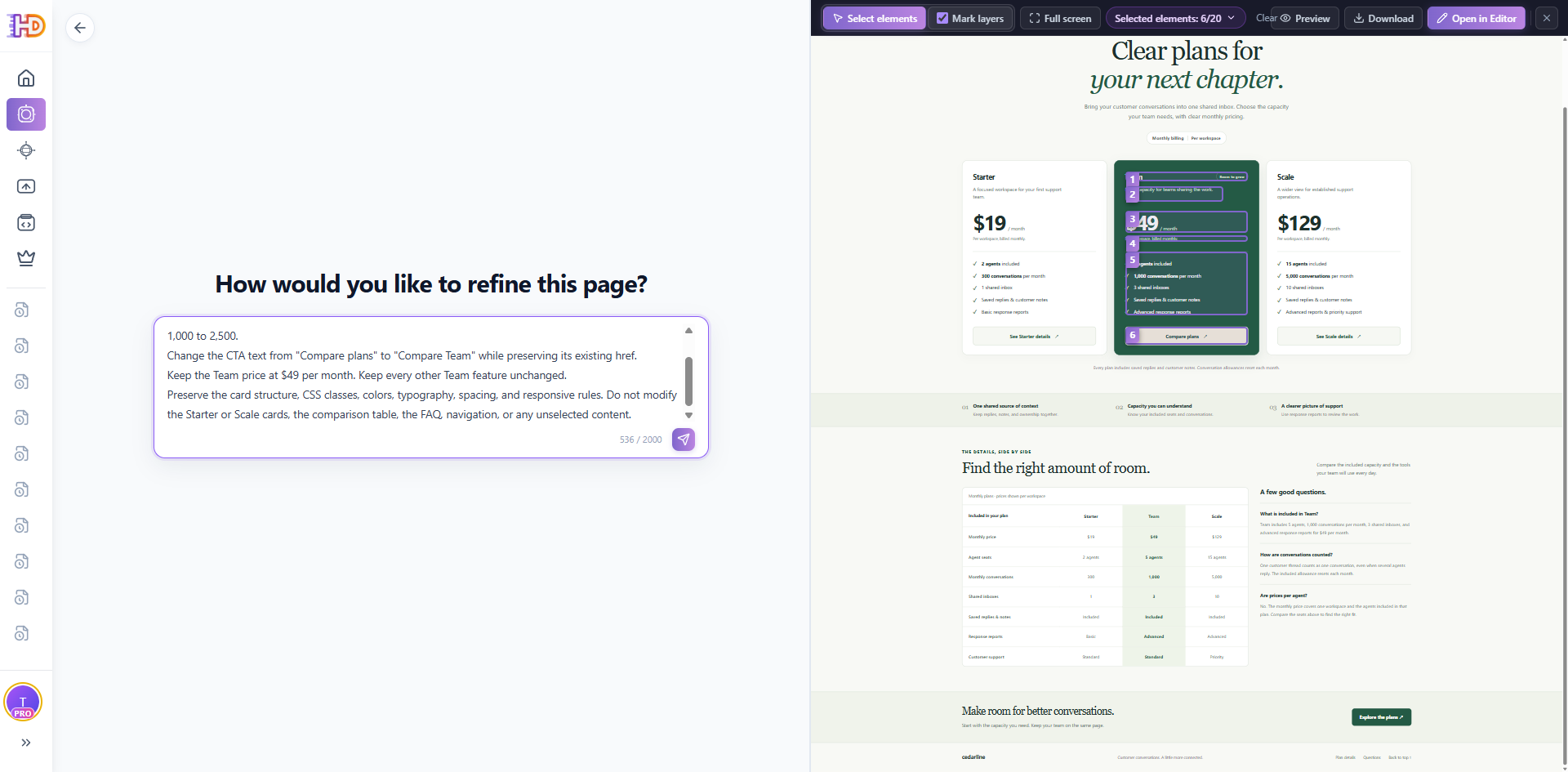 Figure 2. Targeted element selection isolates the Team tier. Feeding only the selected subtree into the AI engine guarantees that adjacent Starter and Scale cards remain completely untouched.
Executing this scoped prompt updates the hero card with surgical accuracy. However, inspecting the rendered output reveals the classic symptom of partial editing: the hero card promises 8 seats and 2,500 conversations, but the comparison table and FAQ immediately below still display the legacy quotas.
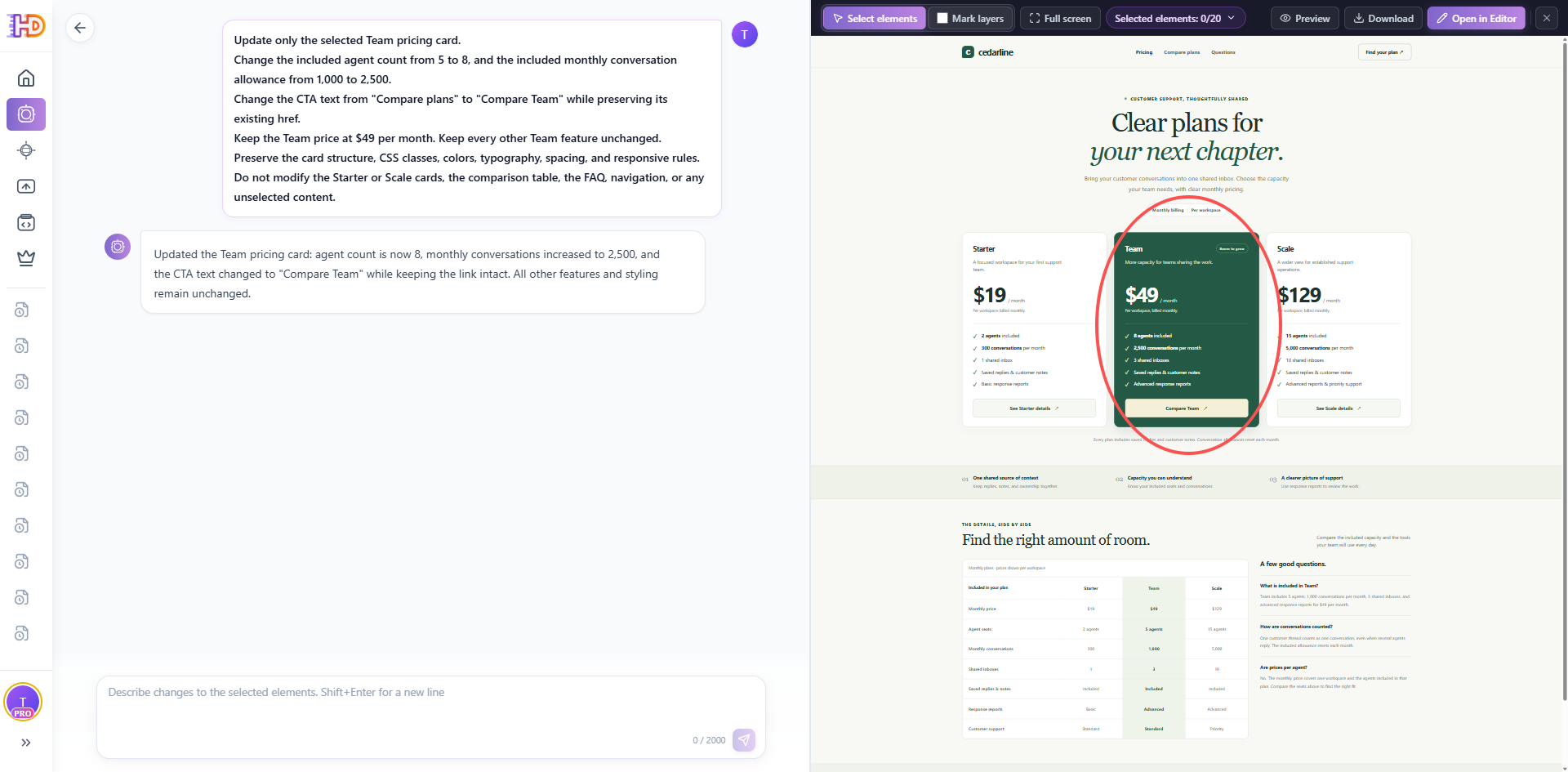 Figure 3. The intermediate state: while the Team card reflects approved metrics, the lower comparison table and FAQ still hold legacy values—demonstrating why a cascading synchronization pass is essential.
Pattern 2: Cascading Multi-Section Synchronization (Matrix & FAQ)
To eliminate this inconsistency, we perform a second targeted pass. We select the details container containing both the comparison table and the plan FAQ, applying a prompt that synchronizes the data points while freezing the table schema and FAQ ordering:
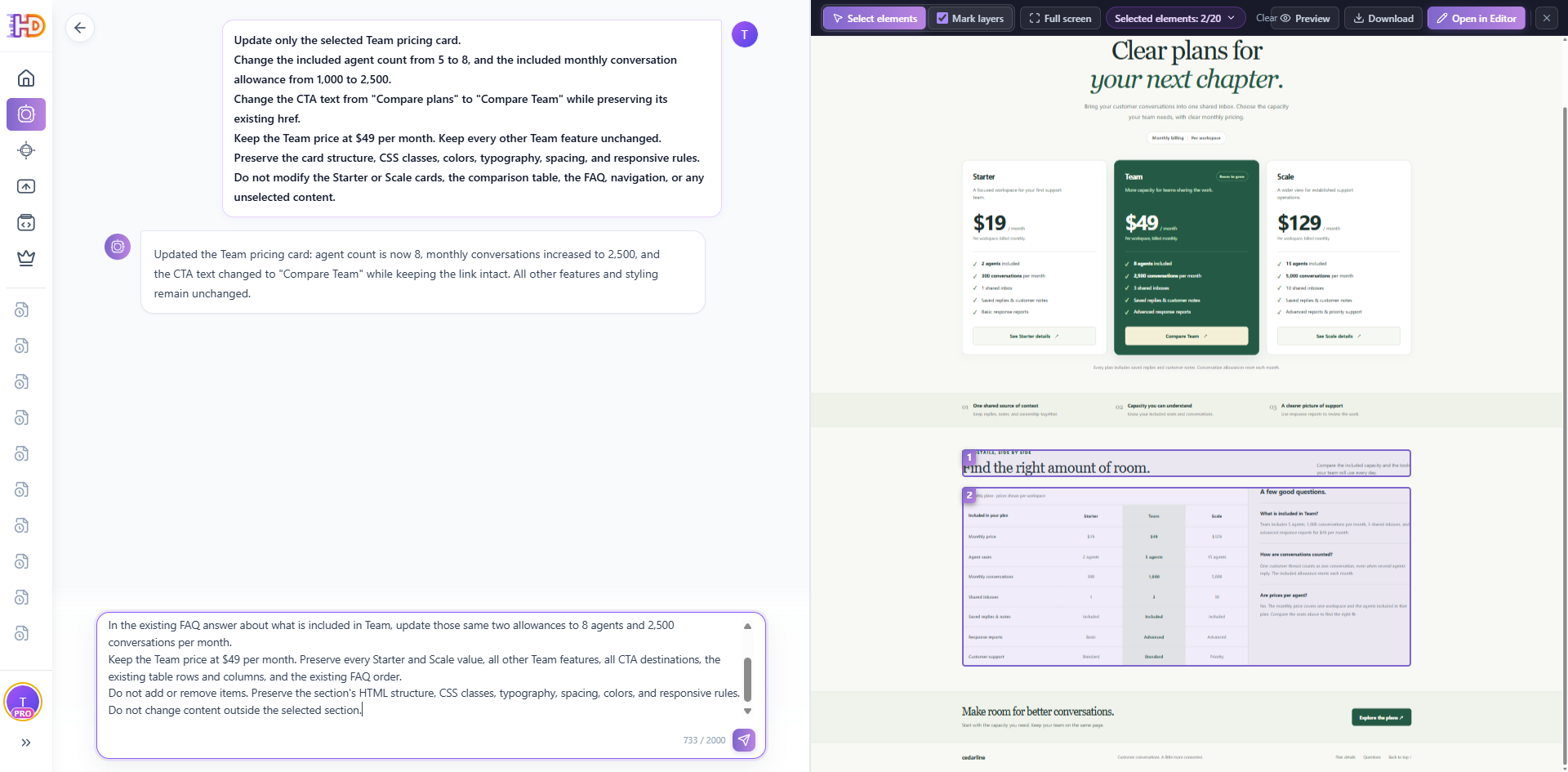 Figure 4. Scoped selection applied to the lower details container. The prompt synchronizes the Team column in the comparison matrix and the corresponding FAQ answer while locking all surrounding rows.
Verifying Cross-Tier Parity
Following the execution of Pass 2, we perform immediate visual and DOM verification across the entire viewport. Both the hero cards and the lower comparison sections now reflect seamless alignment:
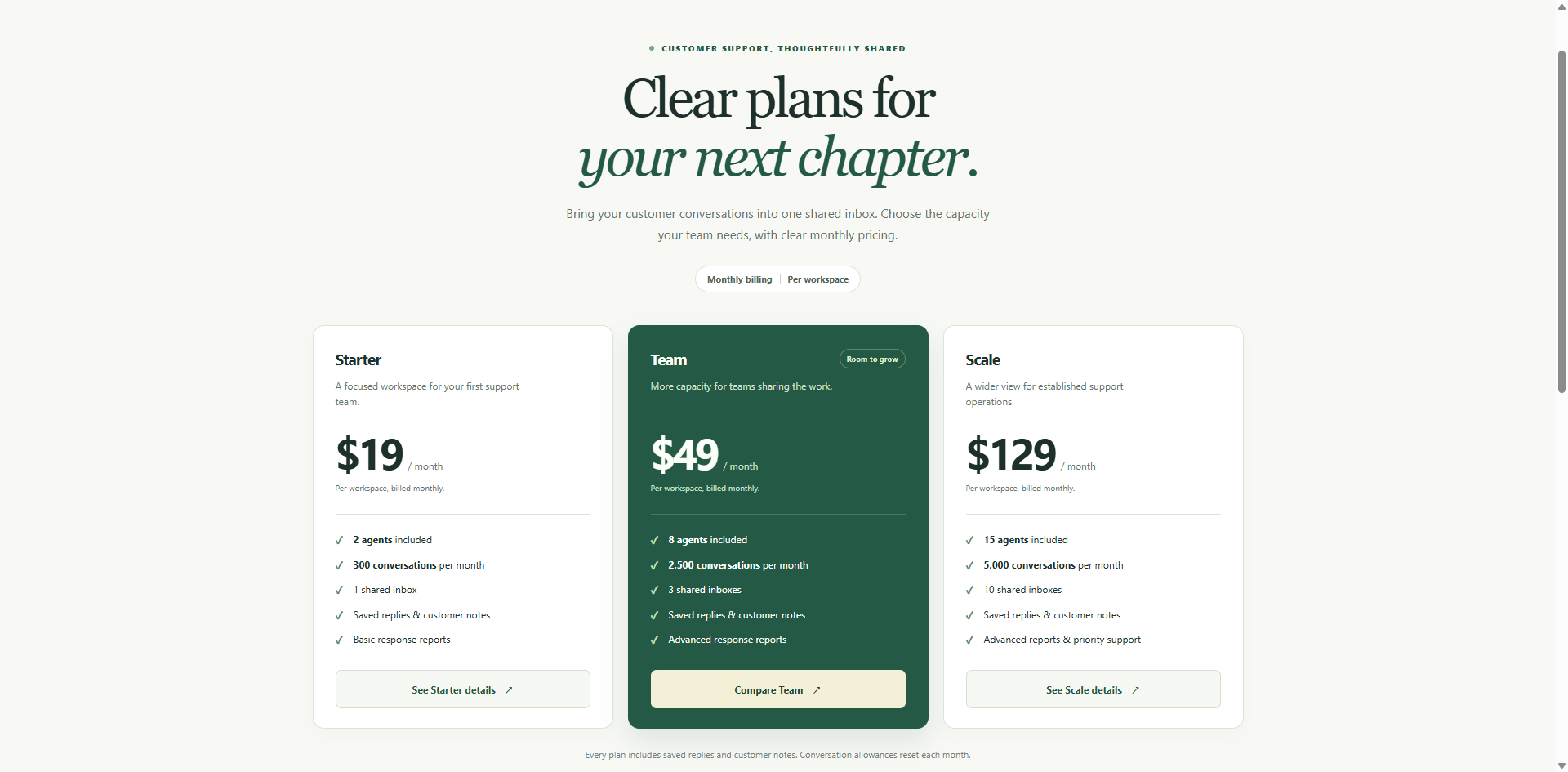 Figure 5. Hero pricing cards verified: Team displays $49/mo, 8 agents, 2,500 monthly conversations, and "Compare Team", alongside unaffected Starter ($19) and Scale ($129) baselines.
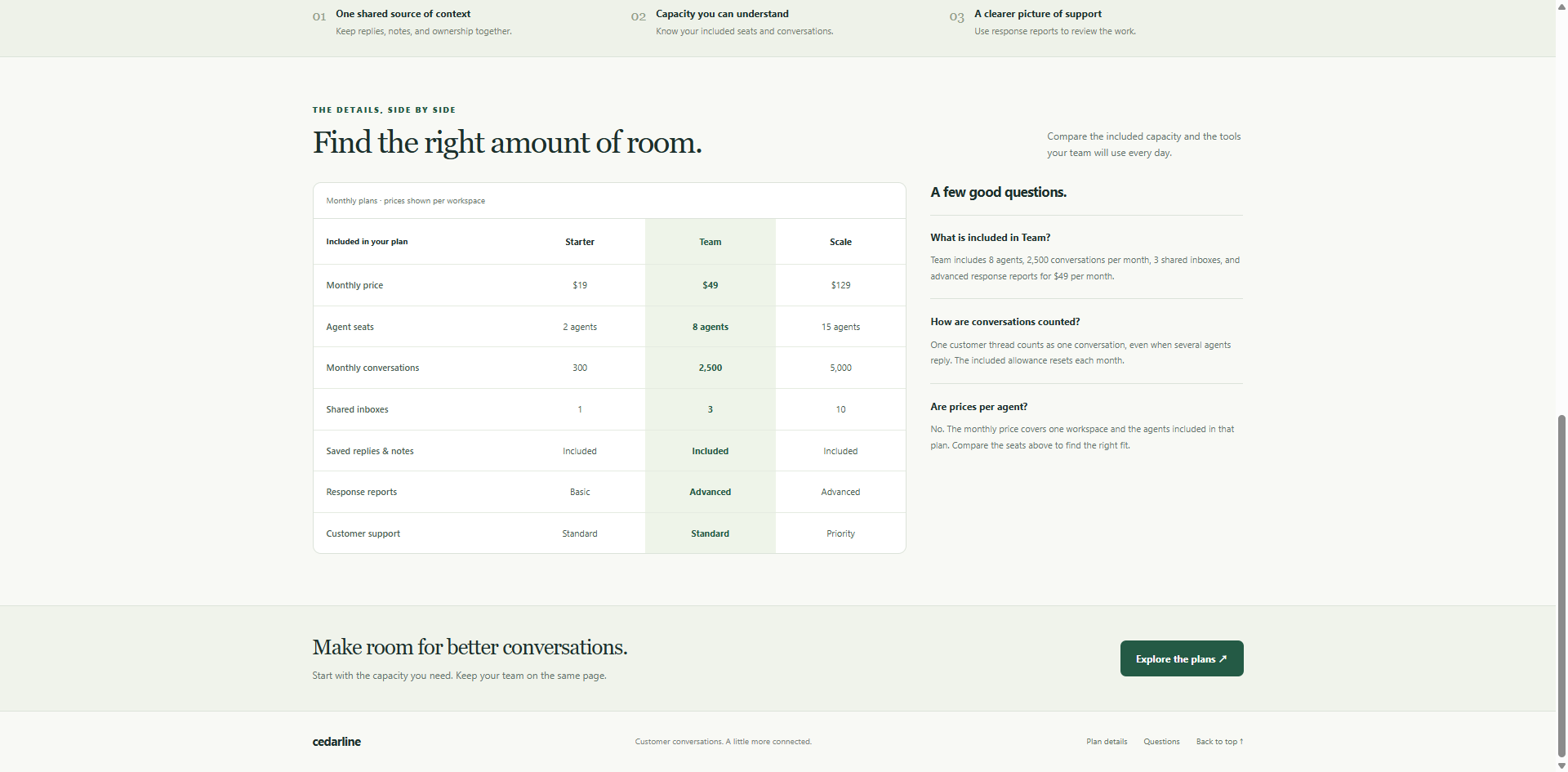 Figure 6. Granular comparison matrix and FAQ accordion verified: the Team column and the FAQ explanatory text reflect identical seat and quota commitments.
Pattern 3: Pre-Flight Automated Parity Audit Prompt
Before proceeding to production export, developers can run a non-mutating analytical prompt to audit the entire document. This prompt inspects the DOM and surfaces any lingering contradictions without altering code:
Phase 4: The Visual Precision Suite for the Final 5%
AI excels at contextual text replacement across multiple nodes, but relying on natural language for pixel-perfect adjustments is inefficient. Once the core facts agree, switch to HtmlDrag's visual HTML editor to finalize micro-interactions and secure the document structure:
- Feature Matrix Manipulation: Use direct table controls to edit individual cells, reorder feature categories, or insert new comparison rows without risking broken `<td>` alignment or responsive table overflow.
- Element Locking (`Lock` feature): Protect finished sections from accidental drag-and-drop displacements while working on adjacent containers. Locking provides visual canvas safety during manual adjustments.
- Micro-Copy & Badge Refinement: Double-click any badge (e.g., "Most Popular", "20% Annual Discount") to tweak copy directly, avoiding unnecessary AI latency.
- Hyperlink & UTM Attribution Binding: Open the link inspector to verify that CTA buttons point to valid checkout endpoints with complete attribution parameters (e.g., `?plan=team&billing=monthly&utm_source=pricing_page`).
- DOM Hygiene & Element Pruning: Select and cleanly delete obsolete promotional banners or placeholder wrapper tags without leaving orphaned DOM artifacts.
- Version Snapshots (`Save version`): Create timestamped checkpoint snapshots before structural changes, ensuring an instant rollback path if layout testing fails.
- Clean Production Export: Export production-grade HTML free of proprietary editor runtime wrappers or vendor lock-in.
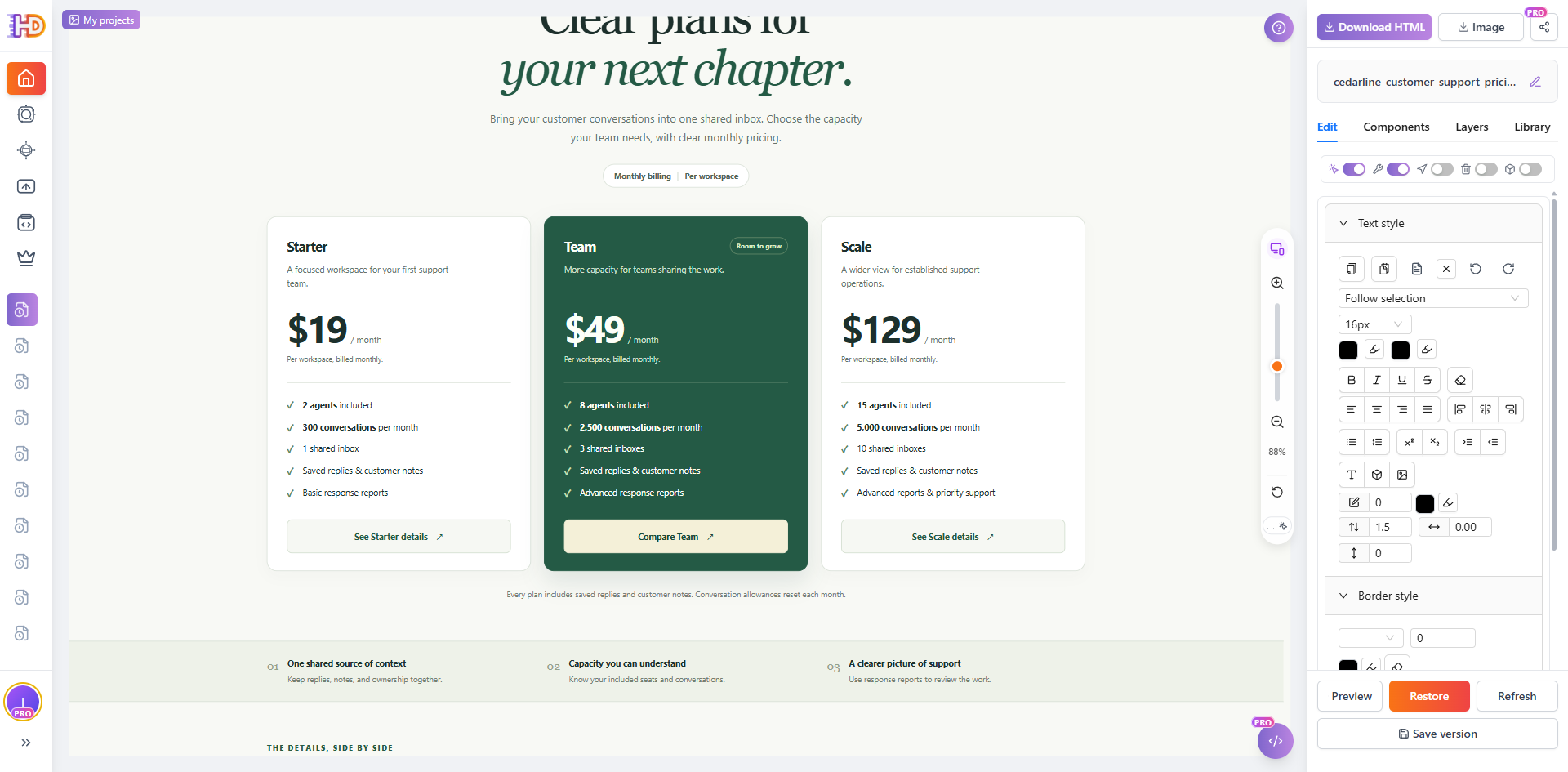 Figure 7. The refined Cedarline pricing page opened in HtmlDrag's Visual Editor mode, demonstrating the visual properties panel, table inspection tools, and version snapshot controls.
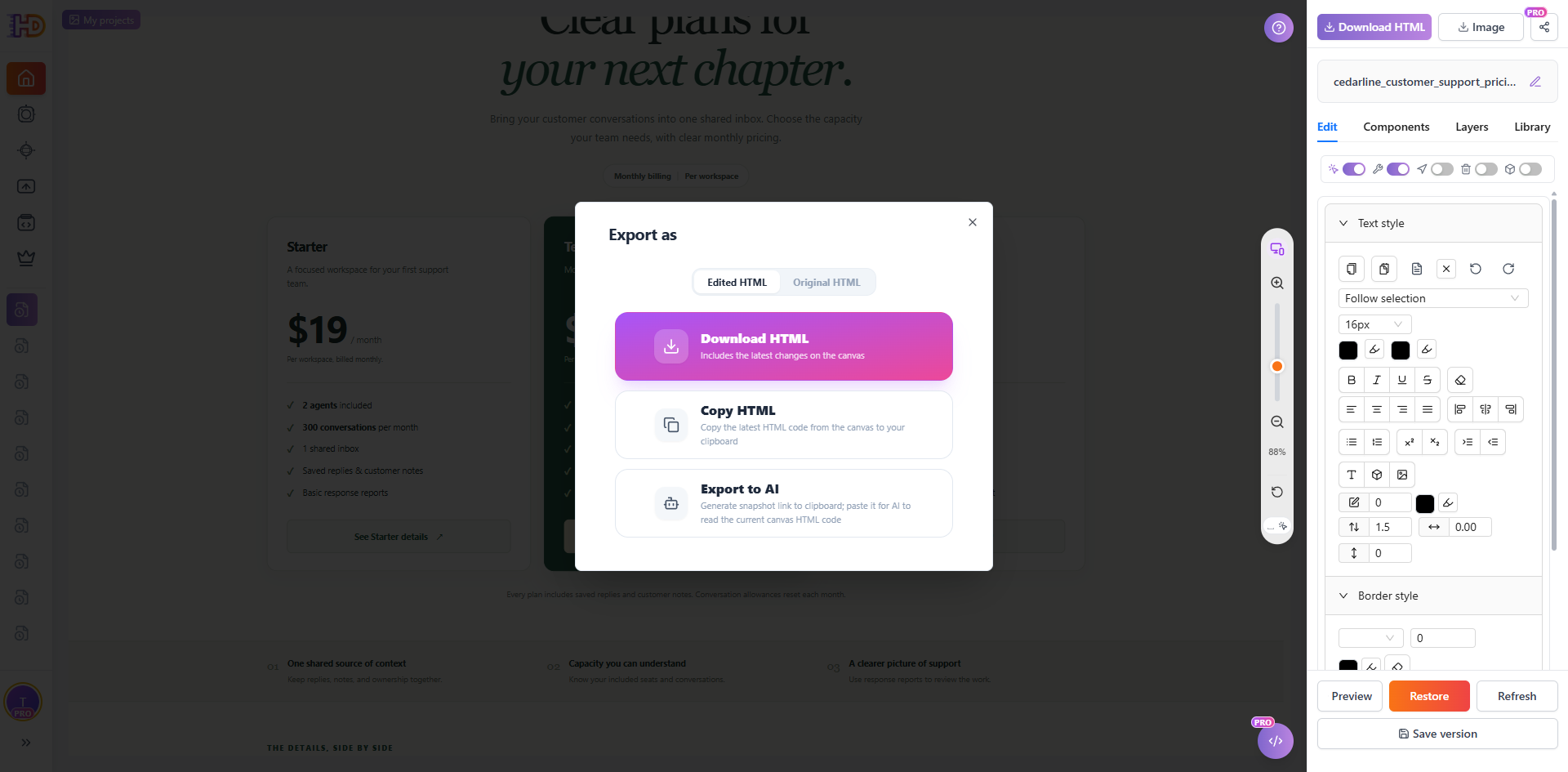 Figure 8. The Export modal with 'Edited HTML' selected. Teams can download clean source code or copy the markup directly into their repository or static hosting platform.
Phase 5: The Production Pre-Flight Checklist
Before committing your exported HTML into git or deploying to your production CDN, run this 6-point verification audit:
- 1. Fact Contract Consistency: Confirm that the monthly price, agent count, conversation quota, and tier name match approved business documentation across every viewport.
- 2. Cross-Block Parity: Verify that values displayed in hero cards, comparison tables, FAQ accordions, and badge callouts are 100% synchronized.
- 3. Tailwind & CSS Class Stability: Check that utility classes (`grid-cols-3`, `gap-8`, hover transitions, and dark-mode styles) were preserved without hallucinated class mutations.
- 4. Responsive Grid & Table Semantics: Test the page at mobile breakpoints (<640px) to confirm that multi-column tables scroll smoothly horizontally and cards stack cleanly.
- 5. CTA Destination & UTM Integrity: Click every action button to ensure destination URLs, checkout route parameters, and analytics UTM parameters are intact.
- 6. Code Hygiene & Framework Verification: Verify exported markup for clean tag closures. If integrating into a dynamic framework (React, Next.js, Vue), ensure static content does not conflict with hydration state.
Frequently Asked Questions
Can I update an AI-generated pricing page without breaking existing Tailwind styles?
Yes. By using scoped DOM isolation rather than full-page regeneration, the AI only interacts with the selected subtree. Adding explicit preservation guardrails in your prompt—such as "Preserve existing Tailwind CSS classes, responsive grid wrappers, and typography"—ensures that styling tokens remain untouched.
Should pricing cards, tables, and FAQs be updated in a single prompt or multiple passes?
For minor textual adjustments, a single well-structured prompt can suffice. However, on complex pages where hero cards and comparison tables reside in distant DOM branches, splitting the work into two targeted passes (Hero Cards first, Details Matrix second) dramatically reduces hallucination risks and makes verification straightforward.
How do I edit an HTML pricing table without causing column misalignment on mobile?
Avoid asking AI to restructure table markup via natural language. Instead, use a visual table editor to modify cell contents or append rows directly. Ensure the parent `<div>` retains `overflow-x-auto` to allow horizontal swipe navigation on narrow mobile screens.
Does element locking guarantee complete CSS isolation?
Element locking in a visual editor prevents accidental drag-and-drop displacements and manual deletions on the canvas. However, if parent stylesheet rules or shared utility classes are modified globally, downstream elements can still inherit styling shifts. Always inspect the rendered page alongside DOM source code.
How do I handle dynamic pricing pages connected to Stripe or React/Next.js?
This workflow refines the presentational HTML and CSS layer. If your application relies on dynamic state (e.g., Stripe Price IDs, currency switchers, or React state hooks), export the refined HTML, extract the updated JSX/markup components, and verify that dynamic props and event handlers are properly connected in your repository.
Does exporting HTML from HtmlDrag automatically publish changes to my live server?
No. Exporting provides clean, production-ready HTML files via download or clipboard copy. You retain full control over your deployment pipeline, committing the updated markup through Git, CI/CD, or your CMS hosting provider.